一時興起,想找部片來看,就選中這片嘍~
本想就算是影片不好看,起碼還能欣賞一下服裝設計。
這部影片除了fashion的服飾之外。主要表達出女主角在領導fashion、開創自己的事業時,失去了哪些。其實整部影片的劇情不多,用一句話就能表達:「初入社會的小女子,在得到令人稱羡的工作時,逐漸失去初衷;最後猛然醒悟,找回自己的人生。」
以演技來說,Meryl Streep不愧是拿了幾次獎的得主,光是片尾的個人表情獨秀,就顯出其功力。Stanley Tucci則飾演一個在時裝界的....助手吧( 我也不知道怎麼定位 ),他在片中有點娘娘腔(也許叫纖細),但眼光到位;在最終被出賣、犧牲時,無奈的吞下苦楚,那表現真是令人感同身受。Anne Hathaway飾演初入社會的小女生,對抗穿prada的惡魔;她充分的表現出其倔強、不服輸。
其實每個人都會追求成為目光的焦點,不論是在見面的打扮、事業的成功等等。但當你往這方向走的時候,是否能有機會一直思考這種生活是否是你所希望的呢?人是貪心的,總想要活得精采。如何在人生的路途上,搖搖擺擺的走,修正自己的路;我想,這是人生中的最大課題。其中,知道該修正自己時,還需要向未知、不穩定邁步的勇氣。
星期五, 3月 02, 2007


星期二, 1月 30, 2007
星期五, 1月 26, 2007
星期五, 1月 19, 2007
XGL, E17
Well, there're lots of window manager.
But I think the 2 ones above have most credits of eye-candy !
If your video card is Intel integrated chipset, than maybe you should try AIGLX rather than XGL.
I saw combinations of GNOME+XGL or KDE+XGL, and I've installed AIGLX+Beryl+GNOME on Intel 945G successfully. I have to say XGL's transparency and cube's rotation is really outstanding. When you press ALT+wheel, you can tweak the transparency. When you press SHIFT+wheel, you can tweak the lightness. When you press windows key+wheel, you'll get a zooming!
It's a good news that XGL seems to be easily installed on Ubuntu Edgy(6.10).
And also, edevelop.org team has been working Elbuntu which window manager is Enlightenment 17 rather then GNOME.
Ubuntu had been a excellent distribution with nice compatibility. Now, I can see it will be a shining distribution!
But I think the 2 ones above have most credits of eye-candy !
If your video card is Intel integrated chipset, than maybe you should try AIGLX rather than XGL.
I saw combinations of GNOME+XGL or KDE+XGL, and I've installed AIGLX+Beryl+GNOME on Intel 945G successfully. I have to say XGL's transparency and cube's rotation is really outstanding. When you press ALT+wheel, you can tweak the transparency. When you press SHIFT+wheel, you can tweak the lightness. When you press windows key+wheel, you'll get a zooming!
It's a good news that XGL seems to be easily installed on Ubuntu Edgy(6.10).
And also, edevelop.org team has been working Elbuntu which window manager is Enlightenment 17 rather then GNOME.
Ubuntu had been a excellent distribution with nice compatibility. Now, I can see it will be a shining distribution!
星期三, 1月 10, 2007
FILE的IO與Encoding
常用的IO class StreamReader就可以設定Encoding
至於要把程式內的utf8 string轉成其它Encoding,以下是msdn的示範
StreamReader sr = new StreamReader("dic/wordlist_utf8.txt", Encoding.UTF8)
至於要把程式內的utf8 string轉成其它Encoding,以下是msdn的示範
string unicodeString = "This string contains the unicode character Pi(\u03a0)喔 是這樣嗎";簡單的說,就是利用Encoding.Convert轉成不同encoding的byte[],然後再把byte[]轉成char[]或是string。
// Create two different encodings.
Encoding ascii = Encoding.ASCII;
Encoding unicode = Encoding.Unicode;
// Convert the string into a byte[].
byte[] unicodeBytes = unicode.GetBytes(unicodeString);
// Perform the conversion from one encoding to the other.
byte[] asciiBytes = Encoding.Convert(unicode, ascii, unicodeBytes);
// Convert the new byte[] into a char[] and then into a string.
// This is a slightly different approach to converting to illustrate
// the use of GetCharCount/GetChars.
char[] asciiChars = new char[ascii.GetCharCount(asciiBytes, 0, asciiBytes.Length)];
ascii.GetChars(asciiBytes, 0, asciiBytes.Length, asciiChars, 0);
string asciiString = new string(asciiChars);
// Display the strings created before and after the conversion.
Console.WriteLine("Original string: {0}", unicodeString);
Console.WriteLine("Ascii converted string: {0}", asciiString);
星期五, 1月 05, 2007
Rmote Desktop 6.0
Network Level Authentication
Network Level Authentication is a new authentication method that finishes user authentication before you establish a full Remote Desktop Connection and the logon screen appears.The advantages of Network Level Authentication are as follows:
| • | It requires fewer remote computer resources at first because remote computer uses a limited number of resources before it authenticates the user. In earlier versions, the remote computer starts a full Remote Desktop Connection. |
| • | It can help provide better security by reducing the risk of denial of service attacks (a denial of service attack attempts to limit or prevent access to the Internet). |
| • | It uses remote computer authentication. This helps protect users from connecting to remote computers that are set up for malicious purposes. |
Server authentication
In Remote Desktop Connection, server authentication verifies that you are connecting to the correct remote computer or server. This security measure helps prevent you from connecting to a different computer or server than you intend to connect to. This also prevents you from unintentionally exposing confidential information.Resource redirection
The Remote Desktop Connection 6.0 client update helps you redirect Plug and Play devices that support redirection.TS Gateway servers
A TS Gateway server is a type of gateway that enables authorized users to connect to remote computers on a corporate network. These authorized users can connect from any computer by using an Internet connection. TS Gateway uses the Remote Desktop Protocol (RDP) together with the HTTPS protocol to help create a more secure, encrypted connection.However, earlier versions of Remote Desktop Connection cannot connect to remote computers across firewalls and network address translators. This behavior occurs because port 3389 is typically blocked to enhance network security. Port 3389 is the port that is used for Remote Desktop connections. However, a TS Gateway server uses port 443. Port 443 transmits data through a Secure Sockets Layer (SSL) tunnel.
The advantages of a TS Gateway server are as follows:
| • | It enables Remote Desktop connections to a corporate network from the Internet without setting up a virtual private network (VPN) connection. |
| • | It enables connections to remote computers across firewalls. |
| • | It helps you share a network connection with other programs that are running on the computer. This enables you to use the Internet service provider (ISP) connection instead of the corporate network to send and receive data over the remote connection. |
Terminal Services Remote Programs
Remote Programs are a feature of Windows Server Terminal Services that lets client computers connect to a remote computer and use programs that are installed on it. For example, a workplace may have a remote computer to which employees can connect and run Microsoft Word. An administrator must first publish the programs for end-users to access them. The experience is the same as running a program that is installed on the computer.Remote Programs make system administration easier because there is only one copy of a program to upgrade or to maintain instead of many copies that are installed on individual computers.
Monitor spanning
Remote Desktop Connection supports high-resolution displays that can be spanned across multiple monitors. However, the total resolution on all monitors must be under 4096 x 2048 pixels. The monitors must have the same resolution. Additionally, the monitors must be aligned side-by-side.To have the desktop of the remote computer span multiple monitors, type Mstsc /span at a command prompt.
Visual improvements
Remote Desktop Connection now supports 32-bit color and font smoothing.http://support.microsoft.com/kb/925876
星期五, 12月 29, 2006
元氣地球人: 打鼾
節錄些重點吧!
打鼾不只會影響枕邊人而已....
輕度打鼾是翻身之後,鼾聲即停止。重度打鼾則是鼾聲不停。
重度打鼾則有可能會使你在睡眠時呼吸停止。當停止呼吸時,腎上腺素增加,心、肺血管收縮;除了增加身体的負擔外,還會從睡眠中驚醒,無法好好休息。
改善打鼾的方法:
打鼾不只會影響枕邊人而已....
輕度打鼾是翻身之後,鼾聲即停止。重度打鼾則是鼾聲不停。
重度打鼾則有可能會使你在睡眠時呼吸停止。當停止呼吸時,腎上腺素增加,心、肺血管收縮;除了增加身体的負擔外,還會從睡眠中驚醒,無法好好休息。
改善打鼾的方法:
- Tennis Ball trick:因為打鼾與平躺的姿勢有關,所以在褲子屁股後方放個網球,讓你自然會側睡,同時並不會中斷睡眠。
- 床傾高10cm:將床的頭部傾高10cm左右,讓整個床有幅度。如此也可改善打鼾的狀況。
- 枕頭不能讓脖子彎:睡在枕頭上,有時候會使得脖子彎曲,反而會打鼾。因此要注意使用的枕頭與睡姿。
- 睡前別喝酒與吃東西:先點出個平常被誤導的觀念「睡前喝點酒,有助睡眠」,這並無錯誤;但是,喝了酒之後,會使得之後的睡眠變短,品質也比較不好,明顯的好處只有加快入睡。
而對於會打鼾的人,睡前吃東西與喝酒,會使得打鼾的狀況更加的嚴重喔!
星期四, 12月 28, 2006
Visual Studio 2003自動加上的[STAThread] Tag
這是描述程式是哪種Thread型態:
至於詳細的差別,就要講到Single-thread與Multi-thread和COM的關係了。
- Single-threaded Apartment[STA]
- Multi-threaded Apartment[MTA]
至於詳細的差別,就要講到Single-thread與Multi-thread和COM的關係了。
When the STAThreadAttribute is applied, it changes the apartment state of the current thread to be single threaded. Without getting into a huge discussion about COM and threading, this attribute ensures the communication mechanism between the current thread and other threads that may want to talk to it via COM. When you're using Windows Forms, depending on the feature you're using, it may be using COM interop in order to communicate with operating system components. Good examples of this are the Clipboard and the File Dialogs.
Windows Forms is not supported within a MTA or free threaded apartment.Applications using Windows Forms should always declare the apartment style they're using, as some other component could initialize the apartment state of thread improperly.
星期三, 12月 27, 2006
西藏阿姐鼓--已被禁止的「人皮鼓」傳奇
沒想到在「阿姐鼓」盪氣迴腸的音樂背後,隱藏著這麼一段悲淒的傳說……。
從歌詞中推敲....
不會說話的阿姐啊!從小離家,天邊傳來陣陣鼓聲,那是阿姐在對我說話啊!原來阿姐已經被製作成了人皮鼓……!
人皮鼓就是手鼓,這是西藏早已廢除的酷刑之一,它是以純潔少女的皮做成祭神的鼓。
人皮鼓是藏傳佛教中的忿怒尊或持明尊所持的法器。以兩個天靈蓋相背接合,再覆蓋人皮,塗成綠色,修法頌讚時,配合金剛鈴杵使用。傳言也有用道行高深喇嘛的皮去做手鼓,因為喇嘛佛法無邊,可以上通佛祖、菩薩,直達天聽。祈福祝禱時,清敲人皮鼓,我佛慈悲便能從天而降,造福人間。
歌詞中,「瑪尼堆」又叫麻尼堆,在有藏人的地區,到處可見一座座以石塊疊成的瑪尼堆。這是藏人將刻有經文、六字真言、咒語或佛像的石塊堆積而成的,再插上經幡,成為藏人往來巡禮的瑪尼堆。藏人相信繞行瑪尼堆,可以祈福消災。尤其是在遠離寺院的僻遠鄉野,瑪尼堆更是藏人宗教生活不可或缺的所在。
何訓田曾說過:「我們到西藏並不是為了尋找西藏,而是為了找尋我們自己……」
在鼓聲中尋找阿姐,尋找失落的自己……。
註: 這是無意間在ETTody上看到的
從歌詞中推敲....
阿姐鼓 Sister Drum
何訓田製作
演唱者:朱哲琴
我的阿姐從小不會說話
在我記事的那年離開了家
從此我就天天天天的想阿姐啊
一直想到阿姐那樣大
我突然間懂得了她
從此我就天天天天的找阿姐啊
瑪尼堆前坐著一位老人
反反覆覆念著一句話
唔嘛呢叭咪唔嘛呢叭咪
唔嘛呢叭咪唔嘛呢叭咪
我的阿姐從小不會說話
在我記事的那年離開了家
從此我就天天天天的想阿姐啊
一直想到阿姐那樣大
我突然間懂得了她
從此我就天天天天的找阿姐啊
天邊傳來陣陣鼓聲
那是阿姐對我說話
唔嘛呢叭咪唔嘛呢叭咪
唔嘛呢叭咪唔嘛呢叭咪
唔嘛呢叭咪唔嘛呢叭咪
不會說話的阿姐啊!從小離家,天邊傳來陣陣鼓聲,那是阿姐在對我說話啊!原來阿姐已經被製作成了人皮鼓……!
人皮鼓就是手鼓,這是西藏早已廢除的酷刑之一,它是以純潔少女的皮做成祭神的鼓。
人皮鼓是藏傳佛教中的忿怒尊或持明尊所持的法器。以兩個天靈蓋相背接合,再覆蓋人皮,塗成綠色,修法頌讚時,配合金剛鈴杵使用。傳言也有用道行高深喇嘛的皮去做手鼓,因為喇嘛佛法無邊,可以上通佛祖、菩薩,直達天聽。祈福祝禱時,清敲人皮鼓,我佛慈悲便能從天而降,造福人間。
歌詞中,「瑪尼堆」又叫麻尼堆,在有藏人的地區,到處可見一座座以石塊疊成的瑪尼堆。這是藏人將刻有經文、六字真言、咒語或佛像的石塊堆積而成的,再插上經幡,成為藏人往來巡禮的瑪尼堆。藏人相信繞行瑪尼堆,可以祈福消災。尤其是在遠離寺院的僻遠鄉野,瑪尼堆更是藏人宗教生活不可或缺的所在。
何訓田曾說過:「我們到西藏並不是為了尋找西藏,而是為了找尋我們自己……」
在鼓聲中尋找阿姐,尋找失落的自己……。
註: 這是無意間在ETTody上看到的
星期六, 12月 23, 2006
Vista破解方法讓時間記數停在30天不倒數
程序的來源 感謝Binbin撰寫
今天,一位名為offlinevista的高手在某俄羅斯破解論壇上發佈了一個測試的程序,該程序用於停止vista中spsys.sys中的計時器來達到停止激活計數器的目的。
這個名為TimerStop的程序確實有效,不過,由於作者沒有經過完整的測試也沒給出適當的安裝教程,導致了很多人不能用,在該貼的回復中就能看出。
經過反覆的測試,我找到了成功使用該程序的方法,並且在Windiws Vista Ultimate版和Home Premuim版上測試通過。
使用該方法達到的效果
1. 激活計數器永遠停留在43200秒(30天)上,不會繼續往下走2. 安裝使用的是默認的內置CD-KEY,可以進行Windows Update
3. 永遠處於初始激活寬限期,理論上MS無法通過聯網的方式將使用過破解的用戶同正常安裝且尚未激活的用戶區分開
4. 可以通過正版驗證,下載MS提供的增值軟件5. Vista設計的時候,就將初始激活寬限期中的前三天(剩餘30日-28日)定位為讓用戶配置硬件驅動和必備軟件,不提示用戶激活。使用該破解後,激活計數器永遠停留在30天,故不會有激活的提醒。只是「系統」屬性裡會有30天的提示而已,不影響使用
具體的安裝方法
QUOTE:
首先,我們需要進行一次名為「2099 ReArm」的操作,這個操作很多人都見過。沒錯,這就是之前流傳的破解方法,不過由於只騙過了安裝時間檢測,卻無法使激活計數器的停止運轉,使得破解不成功。
具體操作為:
單擊「開始」菜單,選擇「所有程序」>「附件」,右鍵單擊「命令提示符」,在上下文菜單中選擇「以管理員身份運行(A)」,並在出現「用戶賬戶控制」對話框中單擊「繼續」。
在命令提示符下首先運行date命令更改日期,將日期更改為2099年12月31日。
接下來運行命令:cscript slmgr.vbs -rearm
待命令完成後,再次運行date命令將日期改回當前日期,如2006年12月19日。
命令操作過程如下:
當前日期: 2006/12/20 三
輸入新日期: (年月日) 2099/12/31
運行命令:cscript slmgr.vbs -rearm,示例如下:
C:\Windows\system32>cscript slmgr.vbs -rearm
Microsoft (R) Windows Script Host Version 5.7
版權所有(C) Microsoft Corporation 1996-2001。保留所有權利。
命令成功地完成。
要使更改生效,請重新啟動系統。
當前日期: 2099/12/31 四
輸入新日期: (年月日) 2006/12/20
這時,可以關閉「命令提示符」,但先不要重新啟動計算機。解壓縮本貼的附件到一個本地文件夾然後右鍵單擊「Vista test crack.exe」,在上下文菜單中選擇「以管理員身份運行(A)」。在程序的對話框中,單擊「Install」按鈕,出現「Service installed」表明安裝成功。關閉程序,重新啟動計算機。
如何檢驗破解已成功
---Already Known------------ 具體操作為:
單擊「開始」菜單,選擇「所有程序」>「附件」,右鍵單擊「命令提示符」,在上下文菜單中選擇「以管理員身份運行(A)」,並在出現「用戶賬戶控制」對話框中單擊「繼續」。
在命令提示符下首先運行date命令更改日期,將日期更改為2099年12月31日。
接下來運行命令:cscript slmgr.vbs -rearm
待命令完成後,再次運行date命令將日期改回當前日期,如2006年12月19日。
命令操作過程如下:
1.首先運行date命令,將日期更改為2099年12月31日,命令行操作示例如下:C:\Windows\system32>date
當前日期: 2006/12/20 三
輸入新日期: (年月日) 2099/12/31
運行命令:cscript slmgr.vbs -rearm,示例如下:
C:\Windows\system32>cscript slmgr.vbs -rearm
Microsoft (R) Windows Script Host Version 5.7
版權所有(C) Microsoft Corporation 1996-2001。保留所有權利。
命令成功地完成。
要使更改生效,請重新啟動系統。
2.再次運行date命令,將日期改回當前日期,如2006年12月20日,示例如下:C:\Windows\system32>date
當前日期: 2099/12/31 四
輸入新日期: (年月日) 2006/12/20
這時,可以關閉「命令提示符」,但先不要重新啟動計算機。解壓縮本貼的附件到一個本地文件夾然後右鍵單擊「Vista test crack.exe」,在上下文菜單中選擇「以管理員身份運行(A)」。在程序的對話框中,單擊「Install」按鈕,出現「Service installed」表明安裝成功。關閉程序,重新啟動計算機。
如何檢驗破解已成功
3.重新啟動計算機後,運行一段時間(幾分鐘即可),按Win+R組合鍵,輸入slmgr.vbs -dlv來查看激活計數器。如果出現的對話框中「剩餘時間」項目的內容為「43200 分鐘(30 天)」即告成功。
Windows Vista Ultimate x86 - 成功!
Windows Vista Home Premium x86 - 成功!
Windows Vista Ultimate x64 - 失敗
星期五, 12月 22, 2006
Another crack
The simple hack for the pirated DVD of Windows Vista ends here. However, there are a more comprehensive method to crack Windows Vista activation that immediately follows the tutorial steps above (skip the above time changing step).
- When Vista installation is finished, boot up Windows Vista and go to the Windows where you’ll required to enter desired account name and password, followed by computer name. Do not enter anything yet, instead press Shift + F10 key together to launch Command Prompt.
- In the launched Command Prompt, type “taskmgr” (without the quotes) to launch Task Manager.
- In the Task Manager window, go to Processes tab, and locate the program called “msoobe.exe”. Select the process and click on “End Process” button to terminate the program.
- The Account Creation screen should disappear and the Welcome Screen should appear. Log with a user called “Other User” and then click the arrow button in the right corner, and then click on “Restart” to restart the system.
- Upon initial stage of system bootup after restarting, press F8 Key to go to Safe Mode.
- In the Safe Mode, go to Start -> Run, and type “control userpasswords2″ (without quotes), and the user accounts setting should appear.
- Go to Advanced tab, and in Advanced User Management section click on Advanced.
- There will be two folders named Users & Groups. Double click on Users folder then right click on the icon named Administrator, and then unchecked the setting that says “Account Is Disabled”.
- Click on OK twice to exit. And don’t restart the computer.
- In the clock and time shown in the Notification Area (System Tray), right click on the Clock and select Adjust Date and Time.
- Go to Internet Time tab, and choose Change Settings, then uncheck (untick) Synchronize with an Internet Time Server option.
- Click OK to exit.
- Restart the computer and boot up to BIOS.
- Reset the computer date and year to current year.
- Boot up the computer to Windows Vista, you should be able to log on as Administrator.
- Go to Start -> Run, and type “winver”, then press Enter or click OK.
- A window will display and mentioned that the product is licensed to: Windows User.
- Beside, in My Computer properties, the computer name will have a randomized name too.
- In Windows Explorer, go to Folder Options, and select Show Hidden Files and Folders settings.
- Browse to C:\Windows\system32\oobe folder.
- Locate and Run msoobe.exe by double clicking on it.
- Input the desired account name, computer name, date and the time zone.
- Windows Vista will then analyze the computer’s performance. Wait for the performance check to complete.
- Once performance check is complete, go to Start -> Run, and type “control userpasswords2″.
- User Accounts window will be launched. Go to Advance, and in Advanced User Management section click on Advanced, and then double click on Users folder.
- Right click on Administrator and then select Properties, and check the Account is Disabled option.
- Restart the computer
- Connect to Internet.
- Verify the computer name and winver display. You’ll have 30 days activation grace period which expires only at year 2099 (or whatever year you set)
星期二, 12月 19, 2006
Windows Vista Crack
To extend the period of Windows Vista Product Activation grace period, use the following hack when the activation grace period of 30 days is almost timeout:
1. Press WinKey + R to open the Run window, or open Command Prompt.
2. Type the following command into the Open textbox, or from the Command Prompt:
rundll32 slc.dll,SLReArmWindows
3. Click OK or press ENTER.
4. Reboot the computer, and Windows Vista will give users another 30 more days for users to activate Windows Vista.
1. Press WinKey + R to open the Run window, or open Command Prompt.
2. Type the following command into the Open textbox, or from the Command Prompt:
rundll32 slc.dll,SLReArmWindows
3. Click OK or press ENTER.
4. Reboot the computer, and Windows Vista will give users another 30 more days for users to activate Windows Vista.
星期六, 12月 09, 2006
Avril Lavigne
唔,約是02年出道,帶有點龐克風的曲風!
我是從Grummy03裡的Complicated這首曲子發現她的~
待我聽完精選輯再來分享吧!
ps.現在好多歌手都有自己的website...
http://www.avrillavigne.com/
我是從Grummy03裡的Complicated這首曲子發現她的~
待我聽完精選輯再來分享吧!
ps.現在好多歌手都有自己的website...
http://www.avrillavigne.com/
An Inconvenient Truth
全長約1小時40分,整体來說,是一部拍得很不錯的宣導影片!
我本以為 可能會很無聊的。因為看起來有點像記錄片嘛...
講得又是Co2+溫室效應這些早已知道的事情
但是,意外的發現內容頗為豐富,除了將全球暖化效應訴諸數據
還結合各方觀點;算是有數據的說明,又不失巨体的描述
影片中還夾雜著Al Gore這幾年的心路歷程.....
看了還滿感動的...要這樣堅持走上這一條路
是要有什麼樣的決心,與付出!
http://www.climatecrisis.net
我本以為 可能會很無聊的。因為看起來有點像記錄片嘛...
講得又是Co2+溫室效應這些早已知道的事情
但是,意外的發現內容頗為豐富,除了將全球暖化效應訴諸數據
還結合各方觀點;算是有數據的說明,又不失巨体的描述
影片中還夾雜著Al Gore這幾年的心路歷程.....
看了還滿感動的...要這樣堅持走上這一條路
是要有什麼樣的決心,與付出!
http://www.climatecrisis.net
星期五, 12月 08, 2006
星期三, 12月 06, 2006
星期二, 12月 05, 2006
ext3/ext2 on windows(WinXP)
note a website
I'm trying a driver on Installable File System (IFS) SDK by Stephan Schreiber.
ref:
http://www.linuxhall.org/modules.php?name=News&file=article&sid=376
I'm trying a driver on Installable File System (IFS) SDK by Stephan Schreiber.
ref:
http://www.linuxhall.org/modules.php?name=News&file=article&sid=376
星期六, 12月 02, 2006
Foobar2000的各式Plugin
裝了幾個foobar的plugin與DSP component
簡記一下~
crossfeed和4front headphone:
都是修正 耳機只聽到一邊聲道,而產生的聽覺定位錯誤(疲勞)
continuator:
Let foobar volume fades in/out when switching songs.
msnalt:
Let foobar interactive with msn's showing playing songs.
convolver:
「Playback」>「DSP Manager」>「Equalizer」(等化器)(我沒使用)
別人調整好的範本
http://sjeng.org/ftp/fb2k/eq_presets.zip
「Equalizer」>「Load Preset」(進入範本解壓縮的目錄),範本副檔名為*.feq,譬如選擇「輕貝斯」(Soft Bass.feq)模式 >「開啟」>「Save all」
「Playback」>「DSP Manager」>「Resampler(PPHS)」
按下右方窗格「Target sampling rate」,選擇「48000」,並勾選右方的「Ultra mode」,按下「Save all」。
為什麼要改成48KHz?原因是為了減少音效卡轉換的失真。一般的歌曲取樣頻率為44.1KHz,但是在Intel制訂AC97的規格時,把音效卡的內定取樣頻率設為48KHz,這樣一來不管你的歌曲是怎麼取樣,都會被強制轉成48KHz,中間便出現了失真,所以我們先利用軟體改成取樣方式為48KHz,來減少失真以加強音質。
□Convolver
Impulse檔下載
http://sjeng.org/foobar2000.html
Convolver可視為通用版的音色音場DSP,它的原理是取一個標準的脈衝響應(Impulse Response)檔案,經過處理之後再錄回去,處理的方式可以是在某個環境下播放、經過某台機器來放、用軟體合成等等。之後只要在Convolver外掛裡載入這個處理好的檔,就能立即將音樂變成處理時的環境。聽起來蠻玄的,但除了模擬教堂那種效果之外,Convolver也可模擬某些機器的音色,像是真空管擴大機等等,非常好玩。上面的網址裡有很多玩家做好的Impulse檔案,載入之後就會立刻變聲,尤其是真空管擴大機的效果,強烈建議試試看!
下載Impulse檔之後,從「Convolver」下按「Load impulse file」就可載入,如果聽到爆音,則取消勾選「Auto level adjust」,並把下面的level adjust往左邊調。
最後,要讓剛才的設定都能生效,選左方窗格的「Playback」>「DSP Manager」,用「<=」將剛才有設定的選項自右邊移到左半部設定才會被載入啟動。
DSP是foobar2000的精華所在,原本只有一個「Volume Control」(控制音量),但右邊有許多DSP外掛可供選擇,foobar2000 DSP的原則是「下面影響上面」,所以記得把「Volume Control」留在最下面。
Related link:
http://stephan.kochen.nl/proj/foobar2000.html
http://blog.yam.com/woodyizie/article/4991126
http://www.yohng.com/headphones.html
簡記一下~
crossfeed和4front headphone:
都是修正 耳機只聽到一邊聲道,而產生的聽覺定位錯誤(疲勞)
continuator:
Let foobar volume fades in/out when switching songs.
msnalt:
Let foobar interactive with msn's showing playing songs.
convolver:
「Playback」>「DSP Manager」>「Equalizer」(等化器)(我沒使用)
別人調整好的範本
http://sjeng.org/ftp/fb2k/eq_presets.zip
「Equalizer」>「Load Preset」(進入範本解壓縮的目錄),範本副檔名為*.feq,譬如選擇「輕貝斯」(Soft Bass.feq)模式 >「開啟」>「Save all」
「Playback」>「DSP Manager」>「Resampler(PPHS)」
按下右方窗格「Target sampling rate」,選擇「48000」,並勾選右方的「Ultra mode」,按下「Save all」。
為什麼要改成48KHz?原因是為了減少音效卡轉換的失真。一般的歌曲取樣頻率為44.1KHz,但是在Intel制訂AC97的規格時,把音效卡的內定取樣頻率設為48KHz,這樣一來不管你的歌曲是怎麼取樣,都會被強制轉成48KHz,中間便出現了失真,所以我們先利用軟體改成取樣方式為48KHz,來減少失真以加強音質。
□Convolver
Impulse檔下載
http://sjeng.org/foobar2000.html
Convolver可視為通用版的音色音場DSP,它的原理是取一個標準的脈衝響應(Impulse Response)檔案,經過處理之後再錄回去,處理的方式可以是在某個環境下播放、經過某台機器來放、用軟體合成等等。之後只要在Convolver外掛裡載入這個處理好的檔,就能立即將音樂變成處理時的環境。聽起來蠻玄的,但除了模擬教堂那種效果之外,Convolver也可模擬某些機器的音色,像是真空管擴大機等等,非常好玩。上面的網址裡有很多玩家做好的Impulse檔案,載入之後就會立刻變聲,尤其是真空管擴大機的效果,強烈建議試試看!
下載Impulse檔之後,從「Convolver」下按「Load impulse file」就可載入,如果聽到爆音,則取消勾選「Auto level adjust」,並把下面的level adjust往左邊調。
最後,要讓剛才的設定都能生效,選左方窗格的「Playback」>「DSP Manager」,用「<=」將剛才有設定的選項自右邊移到左半部設定才會被載入啟動。
DSP是foobar2000的精華所在,原本只有一個「Volume Control」(控制音量),但右邊有許多DSP外掛可供選擇,foobar2000 DSP的原則是「下面影響上面」,所以記得把「Volume Control」留在最下面。
Related link:
http://stephan.kochen.nl/proj/foobar2000.html
http://blog.yam.com/woodyizie/article/4991126
http://www.yohng.com/headphones.html
星期四, 11月 30, 2006
Casio Watch
話說,二週前不小心把手錶遺落給羅斯福路的某過客....
心情很爛...那隻可是老爹送我,伴我8年多的伙伴!
還曾一起去過新疆呢...
在無奈的心情下,找到了這隻Casio錶

就是它,一隻滿有份量的手錶。
錶面用地球紋裝飾,可以記憶5組電話(Useless...),多國時區..等,一些常見的電子錶功能。
整体來說,設計算是中上吧.. 沒有美到亮眼心癢的程度,但也不難看~

這隻錶是為Casio數不多的全金屬錶,除了錶殼是不鏽鋼之外,
連按紐都是金屬的;而且經過拉絲處理,看起來沒有刺眼的閃亮。

此外,錶面是採用抗磨損強化玻璃鏡面。
待續...

心情很爛...那隻可是老爹送我,伴我8年多的伙伴!
還曾一起去過新疆呢...
在無奈的心情下,找到了這隻Casio錶
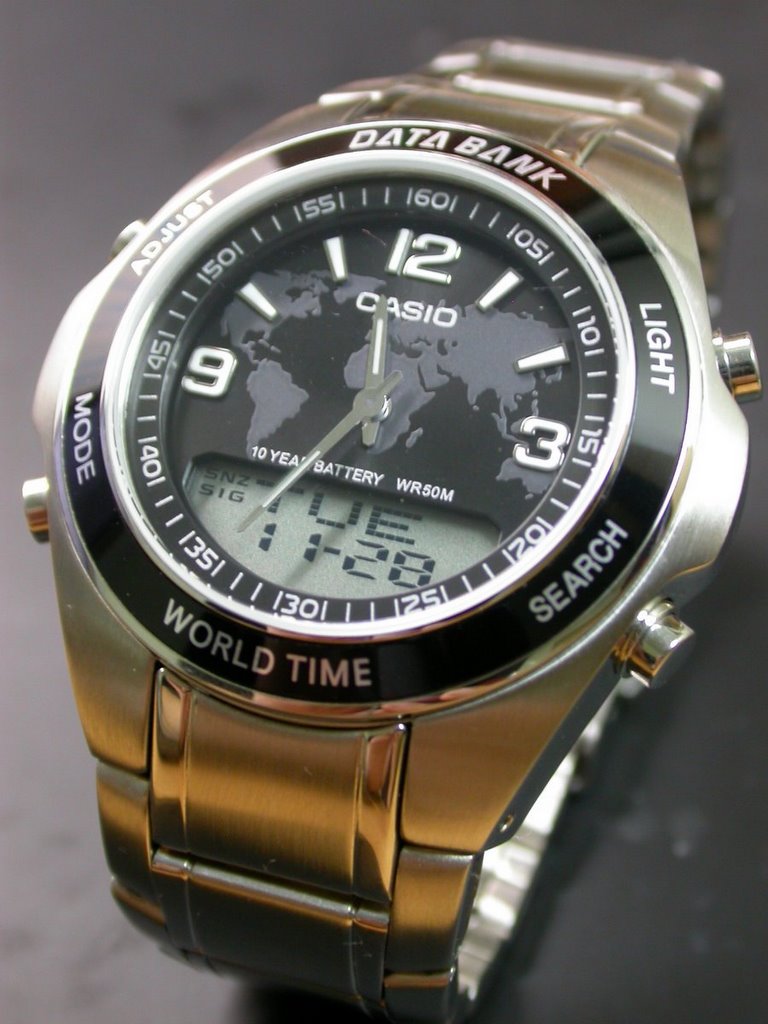
就是它,一隻滿有份量的手錶。
錶面用地球紋裝飾,可以記憶5組電話(Useless...),多國時區..等,一些常見的電子錶功能。
整体來說,設計算是中上吧.. 沒有美到亮眼心癢的程度,但也不難看~
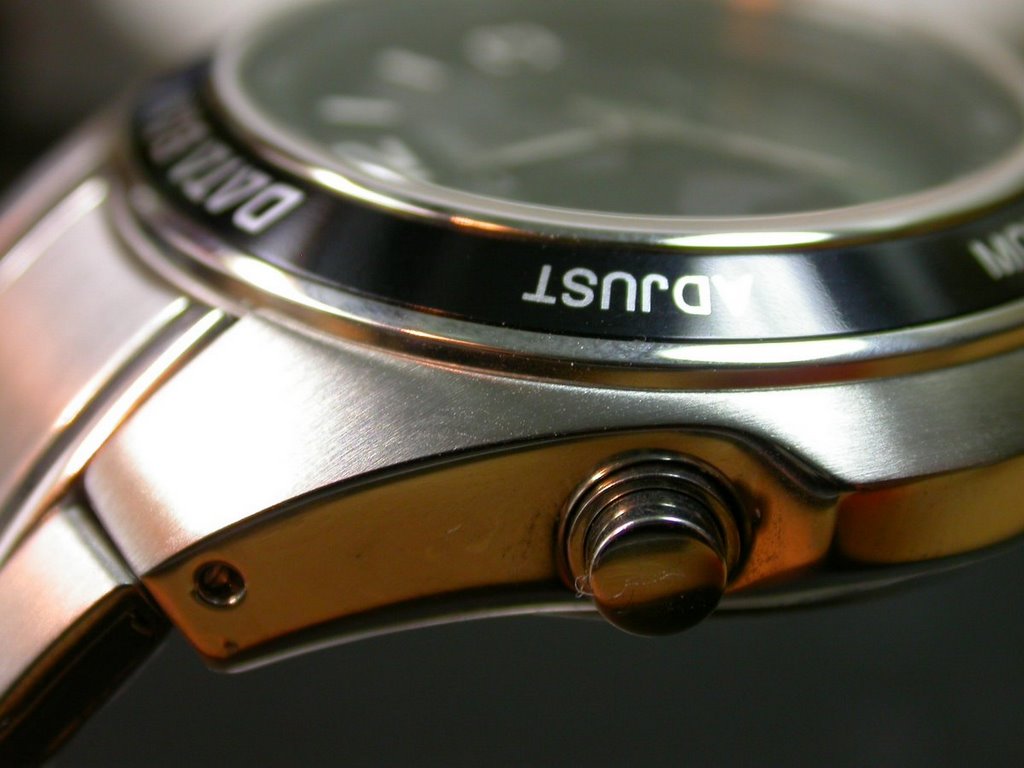
這隻錶是為Casio數不多的全金屬錶,除了錶殼是不鏽鋼之外,
連按紐都是金屬的;而且經過拉絲處理,看起來沒有刺眼的閃亮。
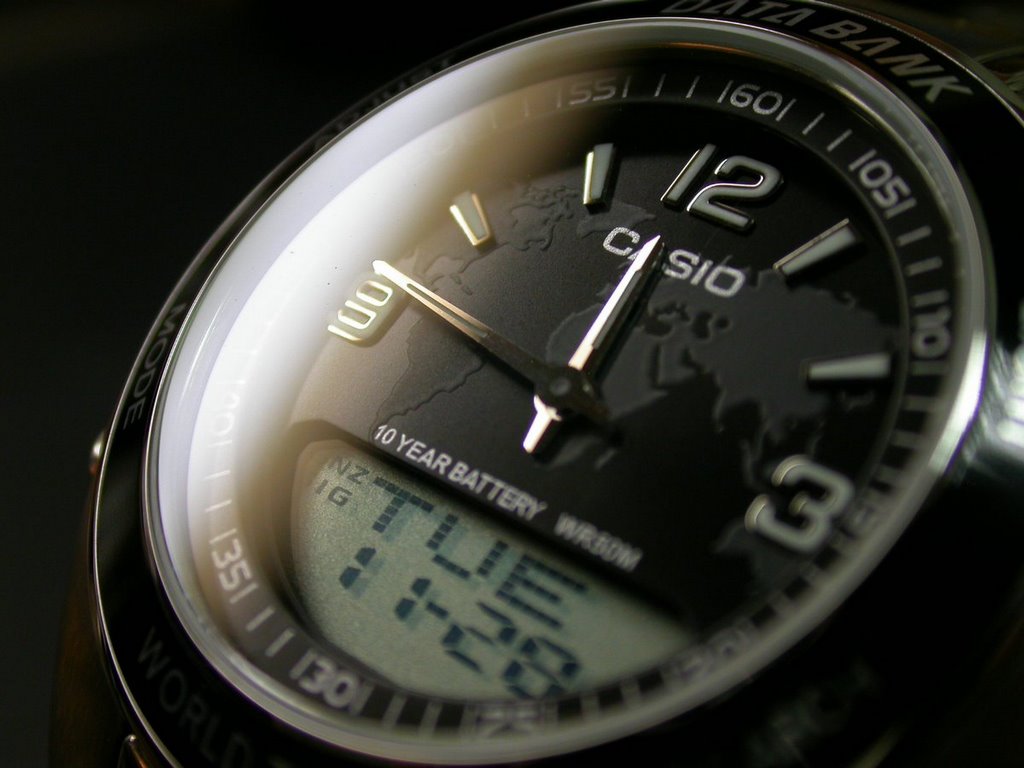
此外,錶面是採用抗磨損強化玻璃鏡面。
待續...

訂閱:
文章 (Atom)